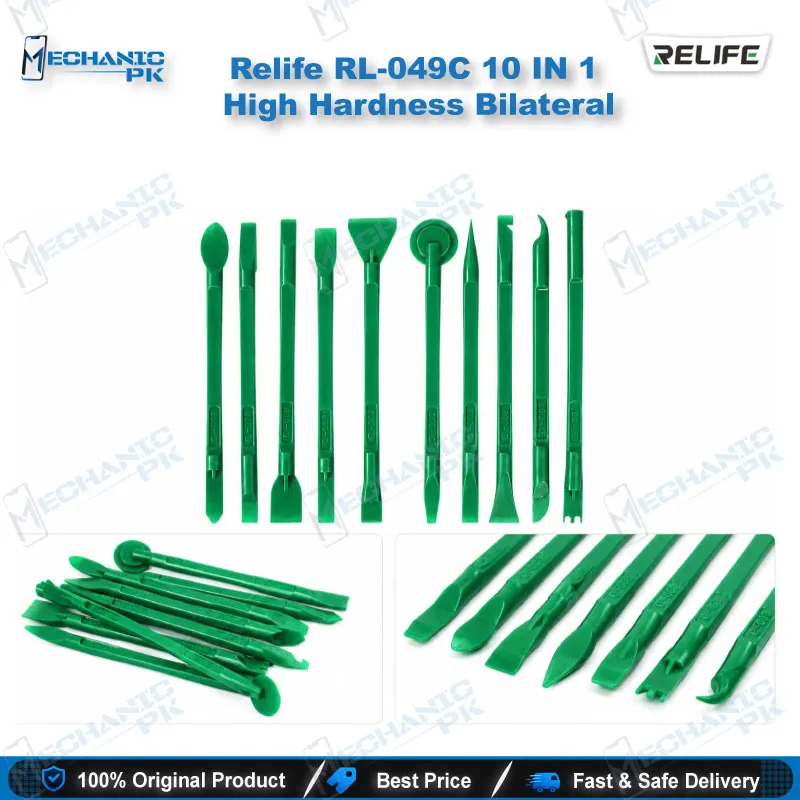
Relife RL-049C 10-in-1 Bilateral Plastic Opening Tool Set
₨ 1
Relife RL-049C Disassembly Tool Set for Phone Opening
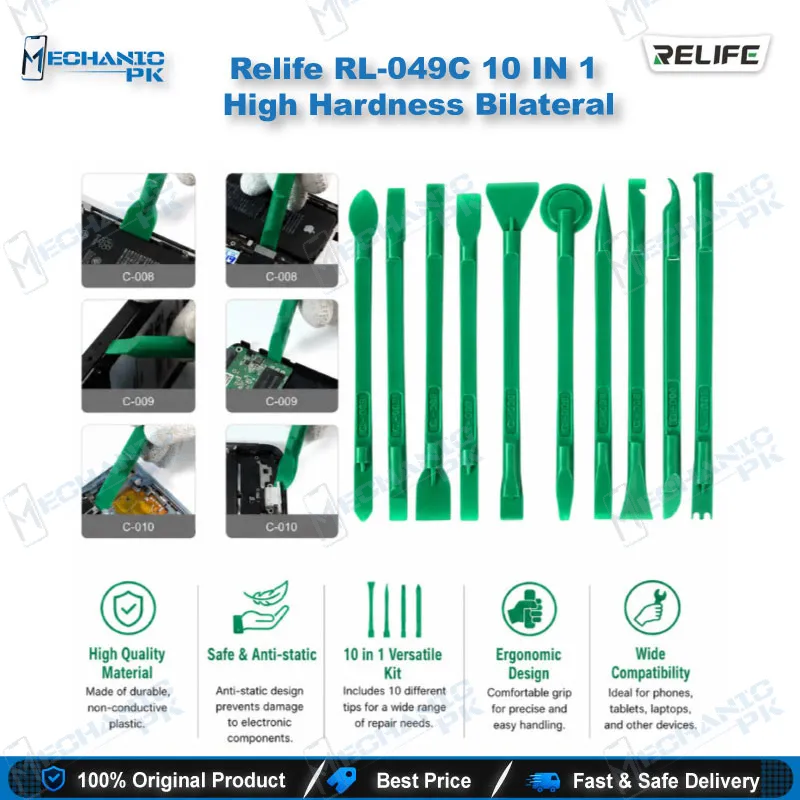
The Relife RL-049C 10-in-1 set brings ten double-ended plastic rods with twenty working shapes to your bench. Pointed and flat tips handle narrow seams on phone frames, LCD edges, and laptop casings, so you can open a device without scratching the housing. The anti-static body offers a comfortable grip for long disassembly sessions. Use it for everyday opening work on iPhone and Android devices, iPad screens, and portable electronics, then keep the rods ready for the next job. It is a practical choice for technicians who need reliable prying tools at a low cost.
Out of stock
Relife RL-049C Disassembly Tool Set for Mobile and Laptop Repair
The Relife RL-049C disassembly tool set gives your repair bench ten double-ended plastic rods that cover twenty working shapes. Each rod has a pointed or flat tip, so you can match the profile to the gap you need to open, whether it sits along a phone frame, beneath an LCD edge, or around a laptop casing. Technicians who open devices every day know the damage a metal blade can cause to a glued display or a cracked frame. These rods work as a softer first step. You lift, slide, and release clips without scoring the housing, and the anti-static body keeps your hands comfortable through long sessions. Ten pieces in one set means you rarely need a second tool mid-job. Mobile repair shops, service centers, and technical training institutes in Pakistan will find it useful for daily opening work.
Choosing the Right Shape from a 10-in-1 Opening Tool Set
Opening a device rarely follows one fixed path, so the set works best when you choose the shape before you apply force. Start by checking where the adhesive sits and where the clips hide along the frame. The pointed picks suit narrow gaps near board edges and tight corners, while the flat heads spread pressure along a long seam without concentrating stress on one point. Work through the rods from the thinnest to the thickest, moving slowly and keeping the pry angle low. This order protects the display cable and keeps the frame intact during the first pass. Test each pick on a hidden seam before you commit to the full pry, which avoids surprises in tight housings. Once you learn which shape fits which seam, the set replaces most improvised tools that cause scratches on your bench. Keep a note of which shapes worked on each model, because repeat jobs go faster with that reference.
Where the Rods Fit in the Repair Sequence
Use these picks during the disassembly phase, before any board-level diagnostics, reflow work, or soldering begins. They handle the removal of back covers, display assemblies, and protective shields on mobile phones. Laptop casings and tablet enclosures respond to the same technique, with the flat head doing most of the separating along panel edges. Reserve the pointed ends for latch points that hide under a lip, since they can lift a clip without bending it. Work slowly around the battery connector, since it sits close to many seams and a slip there causes avoidable damage. After removal, inspect the connectors and ribbon cables for stress marks that the pry may have caused. Keep the rods close to hand during reassembly as well, since light prying can seat clips back into place. This inspection step stops a routine opening from turning into a dead phone at the next stage of your workflow.
Care, Handling, and Anti-Static Use
Store the ten rods together so the tips stay straight and the sharp edges remain protected from knocks. Wipe away adhesive residue with a clean cloth rather than scraping it with force, which can leave marks on the plastic and shorten the tool’s working life. The anti-static material reduces the risk of static discharge when you work near sensitive ICs, but it does not replace a grounded mat and wrist strap at a full-service bench. Replace any rod that has a chipped tip, because a damaged edge slips and scratches the housing. Check the set before each job so you always start with a clean, reliable tool. A tidy tray for the rods also speeds up your next job, because you always know where the right shape is. Label your tray by shape number if your shop trains new technicians, so everyone grabs the right tool first time. Consistent care keeps the Relife RL-049C disassembly tool set dependable across hundreds of openings in a busy repair shop.
| Weight | 0.3 kg |
|---|
Key Features
- Ten pieces with twenty shapes for different disassembly seams
- Double-ended design with pointed and flat tips
- Plastic body that reduces scratches on housings and displays
- Anti-static material for safer handling near sensitive parts
- Comfortable grip for long opening sessions
- Compact size, 145 x 8 x 5 mm per piece
- Lightweight set, 52 g net
- Suitable for phones, tablets, laptops, and game consoles
Specifications
| Brand | Relife |
|---|---|
| Model | RL-049C |
| Category | Opening Tools |
| Compatibility | Universal, not device-specific |
| Supported Devices | Mobile phones, iPad LCD screens, laptops, game consoles, and other digital accessories |
| Material | Plastic |
| Dimensions | 145 x 8 x 5 mm per piece |
| Weight | 52 g net per set |
Common Repair Uses
- Verified disassembly workflows where the tool releases housings and clips.
- Prying open phone back covers without scratching the frame
- Separating glued display assemblies from the phone chassis
- Releasing protective shields and clip retainers during disassembly
- Opening laptop casings and removing panels hidden by screws
- Separating tablet and game console enclosures for access
- Lifting small gaps around chip edges before board-level work
- Freeing cracked display edges for controlled removal
- Cleaning up along seams where old adhesive has hardened
Compatible Devices
- Universal, not device-specific. Verified use across mobile phones, tablets, and laptops.
- iPhone and Android smartphones (LCD and frame opening)
- Apple iPad LCD screens
- Laptops and notebook casings
- Game consoles and other electronic enclosures
- Digital accessories with snap-fit or glued housings
- Mobile phone CPU and SSD area gaps
- Hard disk and flash memory casings
- Chip edges on BGA-level boards (gentle lifting only)
FAQ
What is the product name?
What is the brand of this product?
What is the model of this product?
What is this product used for?
Which devices are compatible with this product?
Who should use this product?
Are the plastic picks safe for opening phones with glued displays?
Can these picks be used for lifting chip-level parts on a motherboard?
Related products