
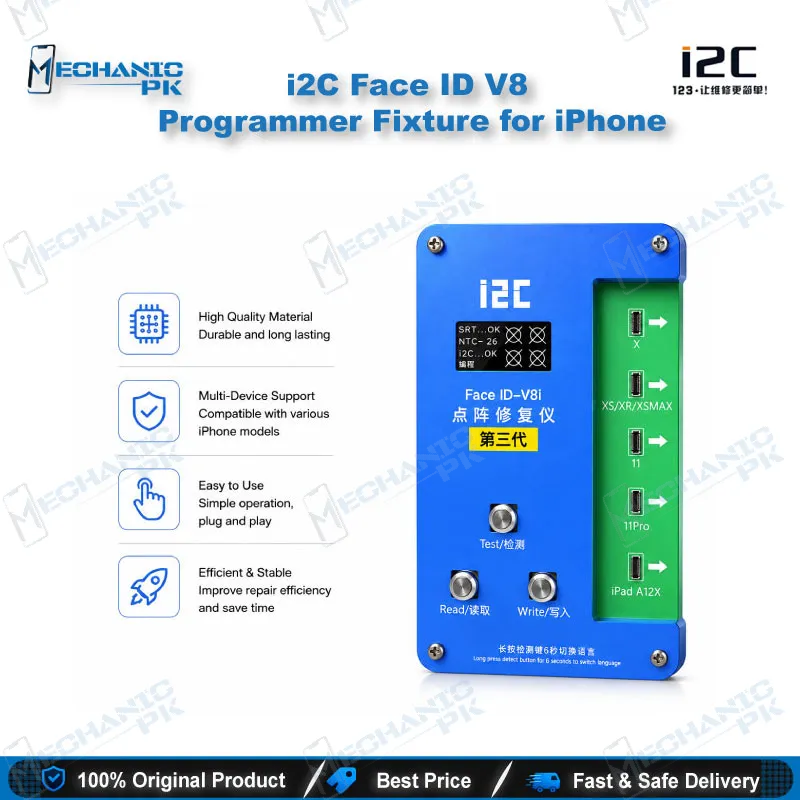





i2C Face ID V8 Programmer Fixture for iPhone
₨ 5,000
i2C Face ID V8 Programmer for iPhone 13 to 17 Pro Max
Repair Face ID dot matrix faults without soldering or disassembly. The i2C V8 gives your bench one-touch read, write, detect, and save operations for iPhone 13 through 17 Pro Max series models. Its plug-and-play design lets you check dot matrix data quickly, store it for reference, and cut repair time on each job. Expansion boards extend the setup to selected X-series and 13 to 16 Pro Max models. Compact and lightweight, it fits a busy repair counter where Face ID complaints arrive every day and fast, reliable diagnosis matters.
In stock
i2C Face ID V8 Programmer for iPhone Dot Matrix Repair
The i2C Face ID V8 programmer gives your repair bench a direct route into iPhone dot matrix faults. Many Face ID complaints look identical from the outside: the phone shows a Face ID error, the sensor area seems dead, or face unlock stopped working after a screen change. Without a proper read and write step, you end up guessing. The V8 replaces guesswork with data. You read the dot matrix information, save it, and write it back once the repair is complete. It targets iPhone 13 through 17 Pro Max series devices and suits technicians who want to avoid the disassembly risk that older methods carry.
Where the V8 Fits in Your Face ID Repair Workflow
Start every Face ID job with diagnostics. Connect the phone, run the detection function, and let the V8 check the dot matrix condition before you open anything. This step tells you whether the fault sits in the stored data, the dot matrix hardware, or the surrounding connection. Your workflow gets cleaner because you stop replacing parts on assumption. The rapid fault detection function identifies dot matrix problems quickly, which helps you decide the next move with confidence. Use the V8 at the start of the job, during the repair, and again before you hand the phone back to the customer, so each stage has a clear result.
Read, Save, and Write: Data Handling on the V8
The one-touch function handles read, write, detect, and save from a single workflow. You do not need to step through a long menu for each action, so your hands stay on the phone and your attention stays on the repair. Saving the dot matrix data before you touch the hardware gives you a safety net. If a repair goes sideways, you have the original information to restore. The data storage and management function keeps records organized across multiple devices, which matters in a shop that handles many Face ID jobs each week. Over time, your saved files become a reference library for recurring model faults, and that library speeds up future diagnosis.
No Disassembly, No Soldering: Protecting the Infrared Components
The biggest advantage of this approach is what you avoid. The no-disassembly method keeps the infrared components undisturbed, which lowers the chance of damaging the sensitive parts that make Face ID work. There is no soldering step, so you skip the heat, the micro-solder joints, and the rework that often follows a failed attempt. The listing also states that the process requires no alignment procedure, which removes one of the most time-consuming steps from Face ID repair. Because the unit is portable and plug-and-play, you can set up at the counter, in a service center bay, or at a field location without a complicated station. Keep the connection stable during reading and writing, and let the tool complete each operation before you disconnect.
Expansion Boards and Compatibility Scope
The V8 base unit covers the core functions, and expansion boards extend coverage to specific model groups. The listed expansion options include a V8 plus X-12PM board, a V8 plus X-16PM board, and a V8 plus 13-16PM board. Match the expansion board to the exact model in your hand before you connect anything. Check the model number on the device, confirm the board name against your job, and keep the correct board paired with the correct phone. Verified support in the listing covers iPhone 13 through 17 Pro Max series models. For devices outside that range, use a tool that matches their specific Face ID architecture rather than forcing the V8 into a job it does not cover.
| Weight | 0.31 kg |
|---|
Key Features
- One-touch read, write, detect, and save in a single workflow
- No soldering required for Face ID dot matrix repair
- No-disassembly method protects infrared components
- No alignment procedure needed for Face ID repair, per the listing
- Rapid detection of dot matrix faults to narrow down the cause
- Portable, lightweight, plug-and-play design for bench or field use
- Data storage and management for organized device records
- Expansion boards for selected X-series and 13 to 16 Pro Max models
Specifications
| Brand | i2C |
|---|---|
| Model | V8 Multifunctional Programmer |
| Category | Face ID Repair Programmer |
| Compatibility | iPhone 13 through 17 Pro Max series |
| Supported Devices | iPhone 13 through 17 Pro Max series |
| Technology | Face ID dot matrix read, write, detect, and save; plug-and-play; no soldering |
Common Repair Uses
- Verified real-world workflows for Face ID dot matrix diagnosis and data handling.
- Diagnosing Face ID dot matrix faults before opening the device
- Reading and saving dot matrix data as a backup before repair
- Writing saved dot matrix data back after a hardware or flex swap
- Restoring Face ID function after a dot matrix connection fault
- Running no-disassembly Face ID checks to protect infrared components
- Verifying Face ID status after a display or sensor-area repair
- Building a stored data library for recurring model faults
- Confirming the repair result before handing the phone back to the customer
Compatible Devices
- Verified scope is iPhone 13 through 17 Pro Max series Face ID dot matrix repair, with expansion boards for selected X-series and 13 to 16 Pro Max models.
- iPhone 13 series
- iPhone 14 series
- iPhone 15 series
- iPhone 16 series
- iPhone 17 Pro Max
- V8 plus X-12PM expansion board
- V8 plus X-16PM expansion board
- V8 plus 13-16PM expansion board
FAQ
What is the product name?
What is the brand of this product?
What is the model of this product?
What is this product used for?
Which devices are compatible with this product?
Who should use this product?
Which iPhone models does the i2C V8 programmer support?
Does the i2C V8 need soldering for Face ID repair?
Related products