
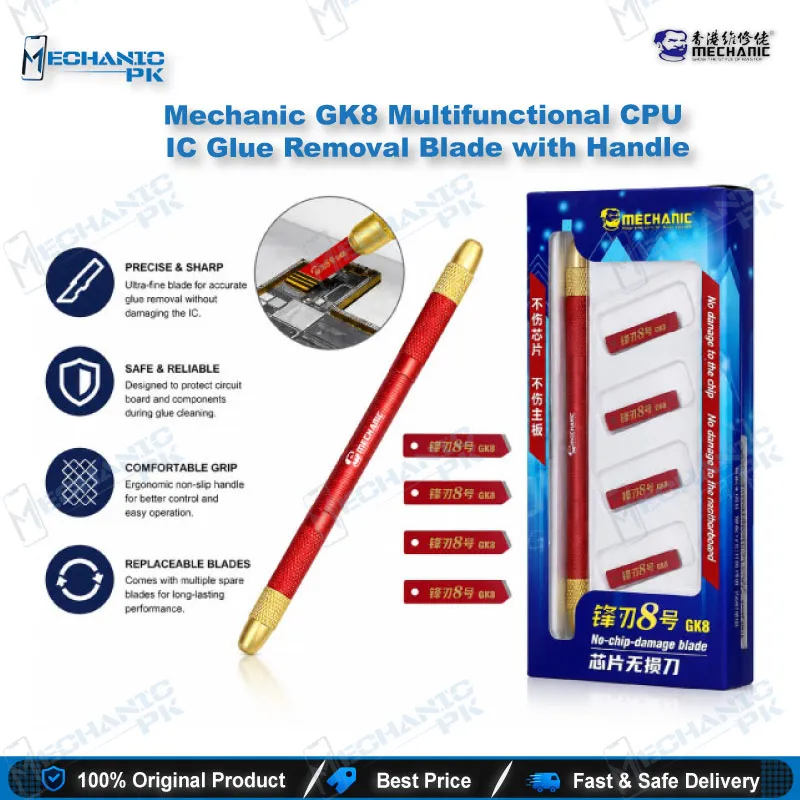
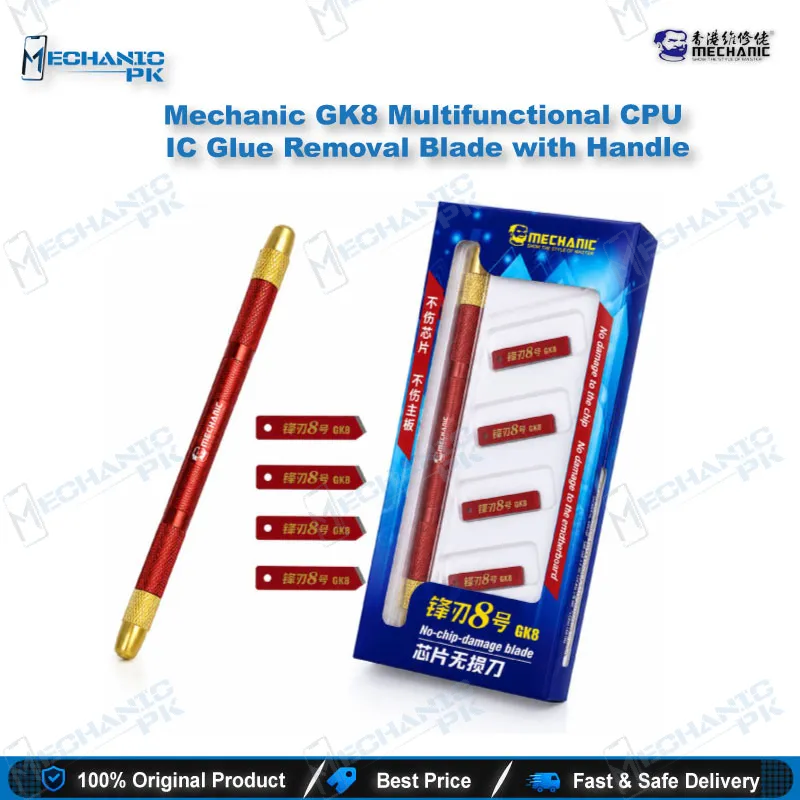
Mechanic GK8 CPU IC Glue Removal Blade with Handle
₨ 1,800
Mechanic GK8 CPU IC Glue Removal Blade for Clean Underfill Work
The Mechanic GK8 gives your repair bench a dedicated way to clear underfill and edge glue from CPU, baseband, and NAND pads on mobile motherboards. Its thin copper blade works the adhesive off in small, controlled passes, which suits the cleanup stage after a chip has been heated and separated. Distributor listings state that the set covers Apple A8 through A13 processors and baseband chips, so you can match it to the boards you handle every day. Use it with steady hands, enough heat to soften the glue, and a microscope to confirm the pads stay intact.
In stock
CPU IC Glue Removal Blade for Mobile Motherboard Cleanup
The Mechanic GK8 CPU IC glue removal blade belongs at the cleanup stage of a board-level repair, after the hard work of heating and separating a chip is finished. Once a CPU or other BGA component comes off the board, underfill and edge glue often stay bonded to the pads, and your repair bench needs a way to clear that residue without damaging the copper traces beneath it. A thin, purpose-built blade lets you work the adhesive off in small controlled passes instead of forcing a rigid tool across the pad row. Mechanic presents the GK8 as a set aimed at CPU, baseband, and NAND-level ICs, so it sits comfortably beside other glue-clearing tools on a working mobile repair bench. Technicians who handle dead phone boards, boot loop boards, and charging-section failures often reach for a blade like this during IC replacement. Used with the right heat, a steady hand, and a clear view under your microscope, it turns a messy residue job into a predictable step before reballing or fitting a new chip.
Where the Blade Fits in Your IC Replacement Workflow
Every glue removal job starts with a clean, well-prepared board, so inspect the motherboard and confirm the exact chip position before you touch any adhesive. Your hot air station should warm the area evenly, so the glue softens across the whole chip edge rather than in one hot spot. Once the glue loosens, you move the blade in short, controlled strokes that follow the pad row. Work outward from the chip edge instead of digging inward, because inward pressure concentrates force on the most fragile pads. After the residue clears, check the pads under your microscope for leftover glue, lifted copper, or fresh scratches. Only then should you apply flux and begin reballing or fitting the replacement IC, since a clean pad field makes every later step, from flux application to final continuity testing, more reliable.
Using the GK8 on A-Series Processors and Baseband Chips
Distributor listings state that the GK8 covers Apple A8 through A13 application processors along with baseband CPU chips. That scope matters when you choose a blade for an iPhone board, because a tool suited to one chip family may behave differently on a smaller package with tighter pad spacing, where a careless stroke carries more risk. Identify the chip family and package on your board before you begin, and match the blade to the job rather than to the phone model alone. The same listings describe use on other ICs across iPhone series and Android motherboards, which makes the blade a practical option for a mixed repair workload that moves between iPhone and Android boards every day. Keep your strokes shallow and aligned with the chip edge, and stop the moment the glue lifts cleanly. Treat every listed scope as a starting point, and verify it against the board in front of you before you commit your time and your board to a repair.
Handling and Care for Copper Blades on the Bench
Copper-based blades reward controlled pressure far more than raw force, so hold the tool at a low angle to the board. Let the edge meet the adhesive rather than dragging across the pad surface, and let the heat do the softening work for you. Wipe the blade between passes to clear softened glue from the edge, because residue builds drag and pushes the blade harder into the pads you are trying to protect. Store the blade flat or in its original packaging so the thin edge stays straight and keeps its bite. Inspect the blade regularly for nicks, bends, or dull spots, and retire any blade that no longer glides smoothly through glue. A well-kept blade gives you consistent results across many jobs, and it prevents the pad damage that a worn edge can quietly cause on a board you are trying to save for a customer who is waiting at the counter.
| Weight | 0.5 kg |
|---|
Key Features
- Copper blade construction for removing glue from IC pads
- Eight-layer ultra-thin progressive elastic copper sheet, per distributor description
- Multi-composite sandwich structure with front and rear protection for the copper sheet
- Designed for CPU, baseband, NAND, and Wi-Fi IC glue removal
- Distributor-stated suitability for Apple A8 through A13 processors
- Suitable for Android motherboard IC cleanup
- Thin edge profile for working along chip perimeters
- Supports pad cleanup before reballing or fitting a replacement IC
Specifications
| Brand | Mechanic |
|---|---|
| Model | GK8 |
| Category | Glue Remover/Cleaner |
| Compatibility | Apple A8–A13 CPU and baseband ICs (distributor-stated) |
| Supported Devices | iPhone and Android motherboard ICs (distributor-stated) |
| Technology | Multi-layer ultra-thin copper sheet with sandwich structure |
| Material | Copper |
Common Repair Uses
- Removing underfill and edge glue from a CPU after heat has loosened the adhesive
- Cleaning residual glue from baseband CPU pads before reballing
- Clearing edge glue from NAND and Wi-Fi IC pads during chip replacement
- Scraping leftover solder paste and glue from pads after a chip comes off
- Freeing the IC perimeter on a motherboard before lifting the component
- Preparing a board’s pad field for a new replacement IC
- Cleaning glue from Android motherboard ICs during component-level repair
- Checking pads for lifted copper after glue removal under a microscope
Compatible Devices
- Apple A8 application processor (distributor-stated)
- Apple A9 application processor (distributor-stated)
- Apple A10 application processor (distributor-stated)
- Apple A11 application processor (distributor-stated)
- Apple A12 application processor (distributor-stated)
- Apple A13 application processor (distributor-stated)
- Baseband CPU chips on iPhone motherboards
- Android motherboard ICs (universal, not device-specific)
FAQ
What is the product name?
What is the brand of this product?
What is the model of this product?
What is this product used for?
Which devices are compatible with this product?
Who should use this product?
Can the GK8 blade remove glue from A8 to A13 CPUs?
Is the copper blade safe for motherboard pads?
Related products