


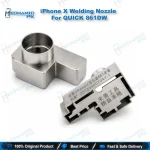
861DW iPhone X Hot Air Nozzle for QUICK Rework Station
₨ 800
861DW iPhone X Nozzle for Angled CPU-Side Heat
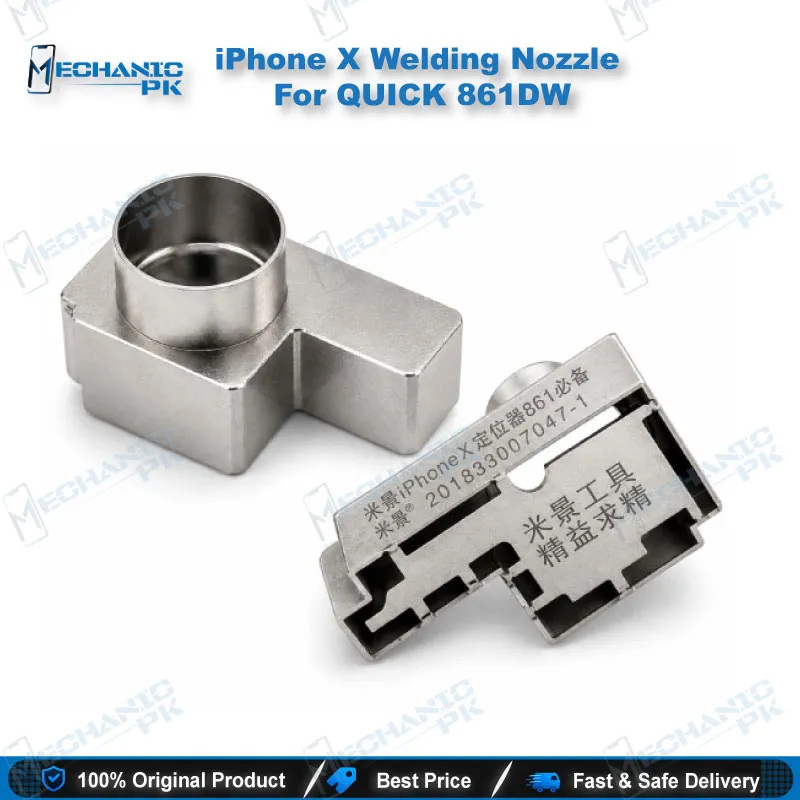
Your 861DW handpiece gets a 45-degree option for iPhone X work. This nozzle sleeve slides over the original air gun mouth of the QUICK 861DW station, so you can aim heat at the CPU side of an iPhone X board without fighting the angle. Use it when a straight nozzle cannot reach a component under the microscope. The sleeve is easy to install and gives you a clear view during operation. Pair it with your existing 861DW rework station and keep your hot air workflow focused on the chip you are removing.
In stock
861DW iPhone X Nozzle: 45-Degree Heat for Logic Board Repair
The 861DW iPhone X nozzle solves one specific problem at the bench. The listing names it directly: CPU-side horizontal heating that a standard nozzle cannot reach. This 45-degree curved sleeve fits over the original air gun mouth of your QUICK 861DW, so the airflow bends toward the component you work on. You keep your existing handpiece and change only the front end. The sections below explain how the angle fits into your rework routine, how to fit the sleeve, and which details the listing confirms.
How the 45-Degree Angle Improves Your Rework Routine
Working under a microscope changes how you hold the hot air handpiece. You often angle the gun to keep a clear view, and that angle pushes the airflow away from the chip you need to heat. A 45-degree sleeve corrects this at the source. You keep the handpiece in a natural position and still aim heat straight onto the target component. This matters most on the CPU side of the board, where space is tight and a straight nozzle struggles to reach the spot. Reserve the sleeve for side-heating jobs and keep your straight nozzles for open areas.
Start with a test heat on a scrap or spare board before you commit to a live repair. This lets you confirm the sleeve angle matches your hand position and your microscope view. Adjust your handle position rather than forcing the airflow onto the chip. Your workflow gets steadier once your hand stops fighting the geometry.
Fitting the Sleeve to Your QUICK 861DW Handpiece
The sleeve installs over the original air gun mouth of the station, so you do not need a separate handpiece. Slide it on until it sits fully over the mouth, then check the fit before you power the station. If the sleeve feels loose during use, the listing recommends pinching the middle part with pliers to tighten the grip. Pinch gently and recheck the seat after each adjustment. Let the unit cool before you handle the metal parts or swap nozzles. A secure fit keeps the airflow aimed where you point it.
Inspect the sleeve for damage or heavy discoloration before every session. A cracked or deformed sleeve loses its alignment, and the heat pattern shifts away from your target. Replace a damaged sleeve before it affects a board you cannot afford to lose.
Choosing the Right Option for iPhone X Work
The listing offers 6mm, 7mm, and 9mm 45-degree sleeves alongside an option labeled 861DW iPhone X Nozzle. The listing also states the sleeves suit the QUICK 861DW and TR1300A stations. It does not state a diameter for the iPhone X option, so confirm the size with the seller before you order. Match the sleeve to the component footprint on your board. Ask the seller for measurements and photos before purchase, because a mismatched size costs you time at the bench.
Compare the sleeve against your current straight nozzles on the same component. Note how the heat pattern shifts so you can pick the right sleeve faster on future jobs. Keep a short log of which size works for each board area. Your bench gets faster when your nozzle choice becomes a routine decision instead of a trial.
| Weight | 0.9 kg |
|---|
Key Features
- 45-degree curved sleeve for side heating
- Fits over the original air gun mouth of the QUICK 861DW
- Lets you aim heat directly onto the chip while you use a microscope
- Easy to install with a clear view during operation
- Pinch the middle part with pliers if the sleeve loosens
Specifications
| Brand | QUICK |
|---|---|
| Model | 861DW iPhone X Nozzle |
| Category | Hot Air Rework Nozzles |
| Compatibility | QUICK 861DW, QUICK TR1300A |
| Supported Devices | Apple iPhone X |
| Technology | 45-degree hot air nozzle sleeve |
Common Repair Uses
- CPU-side heating on an iPhone X logic board where straight nozzles cannot reach
- Aiming hot air at a chip under a microscope with the handpiece held at an angle
- Side heating during chip removal in tight board areas
- Heating components where handpiece angle is restricted
Compatible Devices
- QUICK 861DW hot air rework station
- QUICK TR1300A hot air soldering station
- Apple iPhone X board work
FAQ
What is the product name?
What is the brand of this product?
What is the model of this product?
What is this product used for?
Which devices are compatible with this product?
Who should use this product?
Does this nozzle fit the QUICK 861DW handpiece?
What size is the 861DW iPhone X nozzle?
Related products