























Qianli Dot Projector Calibrator for iPhone X/XS/XR/XS Max
₨ 4,999
Qianli Face ID Dot Projector Fixture
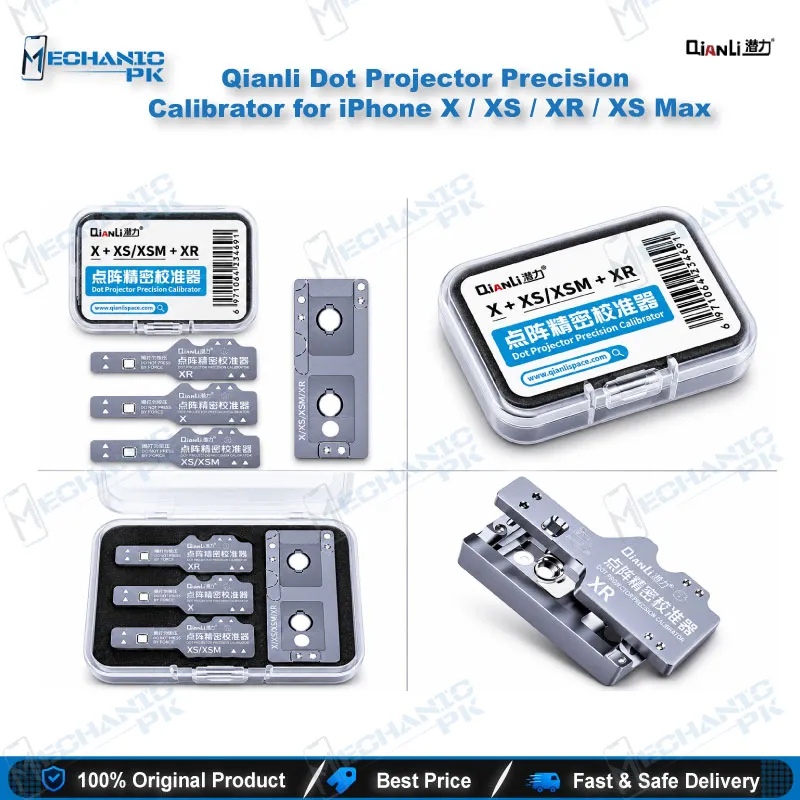
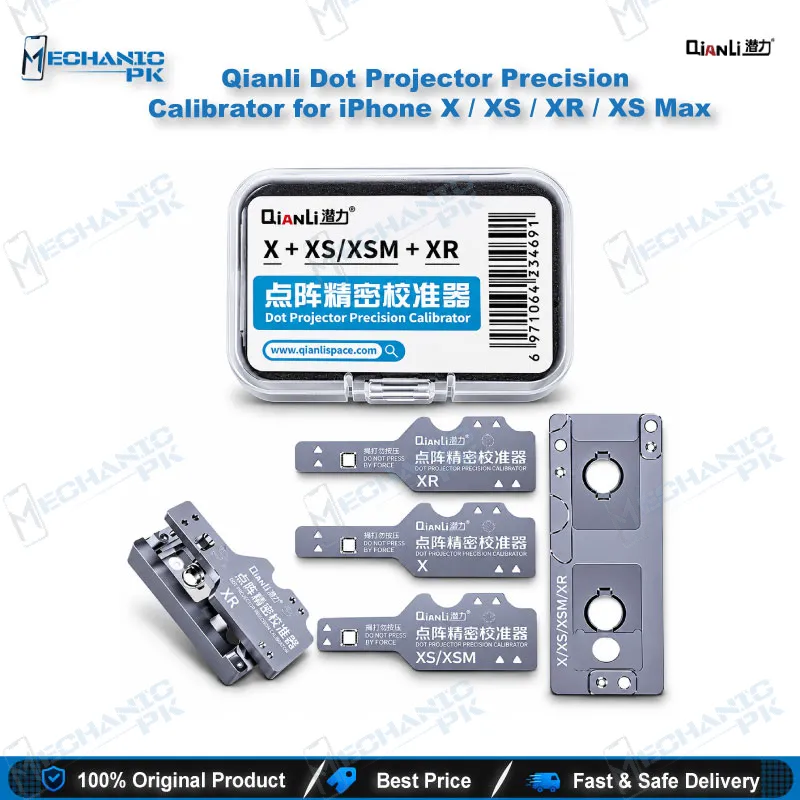
The Qianli dot projector calibrator for iPhone X holds the Face ID dot projector in exact position while you work on the flex cable and module. Its high-hardness aluminium alloy body locks the part fast. Cutouts for the front camera, infrared camera and dot projector give you clear reference points. One fixture covers the iPhone X, XS, XR and XS Max, so a bench that handles the X series needs no model-specific swaps. Choose it if you repair Face ID faults and want repeatable alignment instead of holding the projector by hand.
In stock
Dot Projector Calibrator for iPhone X Series Face ID Repair
The Qianli dot projector calibrator for iPhone X gives your Face ID repair a fixed reference point instead of a steady hand and a guess. The TrueDepth system in the iPhone X, XS, XR and XS Max relies on the dot projector sitting correctly against its flex cable, beside the front camera and the infrared camera. When you replace or rework that module, alignment becomes a variable you control or a variable that controls your result. This fixture holds the part where it belongs while you work, so you set the position once and keep it.
Key Technical Highlights
The body uses high-hardness aluminium alloy. That matters on a repair bench because a fixture that flexes or wears down loses the positioning accuracy you bought it for. Aluminium alloy keeps its shape through repeated use, and fast fixation means you clamp the module in and move on without fiddling.
The hole layout does the alignment work. Both the fixture and its base carry cutouts for the front camera, the infrared camera and the dot projector, and those cutouts let you set the projector’s position against the flex precisely. You see each component against its reference instead of judging by eye under the microscope.
Compatibility stays simple. A single fixture covers the iPhone X, XS, XS Max and XR, so you do not stock four separate holders for four near-identical TrueDepth assemblies.
Where It Fits in the Face ID Repair Workflow
Face ID repair on the X series is a bench process with several stages: diagnosing the fault, separating or replacing the dot projector, working on the flex cable, and reassembling the module before you test Face ID setup. The calibrator covers the positioning stage. It does not replace a repair programmer, and it does not read or write dot projector data. It makes sure the physical alignment is right once the electronic side is done.
Pair it with a good microscope so you can check the seating of the projector against the cutouts. Use a stable PCB holder for the board or front assembly, a soldering station or hot air station for any rework on the flex, and a multimeter to confirm continuity before you close the phone. If you reball or reflow components in the same repair, a reballing kit belongs on the same bench. Keeping the fixture beside these tools turns Face ID work into a repeatable routine instead of a one-off experiment.
Why Technicians Choose It for the X Series
Face ID faults reach most Pakistani repair shops as “Face ID not working” jobs, often after a drop, a screen replacement or a water-damaged front assembly. Those jobs pay well, but a failed attempt costs you a flex cable and your customer’s patience. A positioning fixture lowers the number of variables in that job, which protects your margin on every attempt.
The fixture also standardises the work across your shop. When two technicians share a bench, a fixed reference gives both of them the same result, so you do not depend on one person’s steady hands. Service centres that handle volume benefit most, because repeatability beats individual skill when the queue grows.
Know the scope before you buy. This version covers the X, XS, XS Max and XR generation. Qianli lists separate calibrators for the iPhone 11 series and the iPhone 12 series, so if your queue includes those models you add those fixtures later. Starting with this one gives you an affordable entry point into Face ID repair, and you expand the fixture set as your repair volume and model range grow.
| Weight | 0.25 kg |
|---|
Key Features
- Fast fixation for quick module clamping
- One fixture for iPhone X, XS, XS Max and XR
- High-hardness aluminium alloy construction
- Precise positioning aid for the dot projector
- Cutouts for front camera, infrared camera and dot projector
- Matching hole layout on fixture and base for flex alignment
Specifications
| Brand | Qianli |
|---|---|
| Category | Face ID Dot Projector Repair Fixture |
| Compatibility | iPhone X, iPhone XS, iPhone XS Max, iPhone XR |
| Supported Devices | iPhone X-series (X, XS, XS Max, XR) |
| Material | High-hardness aluminium alloy |
Common Repair Uses
- Face ID dot projector positioning and alignment during X-series repairs
- Holding the dot projector in position during flex cable work
- Aligning the dot projector against the front camera and infrared camera cutouts
- Seating a replacement dot projector module after repair
- Aligning the dot projector flex cable during reassembly
- Keeping repeatable positioning across repairs on a shared bench
Compatible Devices
- iPhone X-series models (X, XS, XS Max, XR)
- iPhone X
- iPhone XS
- iPhone XS Max
- iPhone XR
FAQ
What is the product name?
What is the brand of this product?
What is the model of this product?
What is this product used for?
Which devices are compatible with this product?
Who should use this product?
Does this fixture work on iPhone 11 or iPhone 12 series phones?
What does the cutout layout on this fixture align?
Related products