

















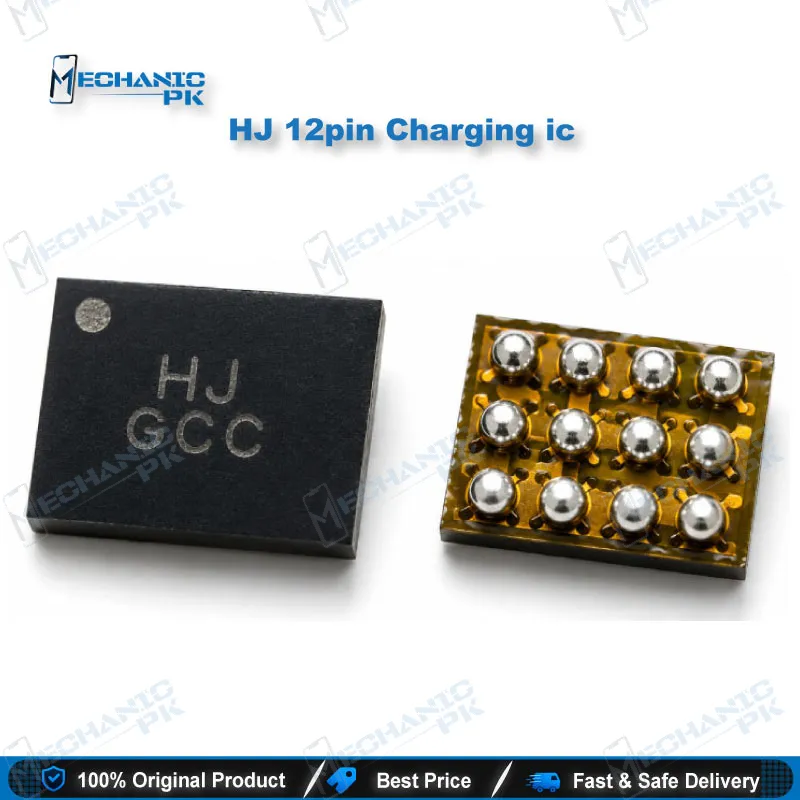
HJ 12pin Charging ic for Android Phone Charging Repair
₨ 250
HJ 12pin Charging ic for Board-Level Charging Repair
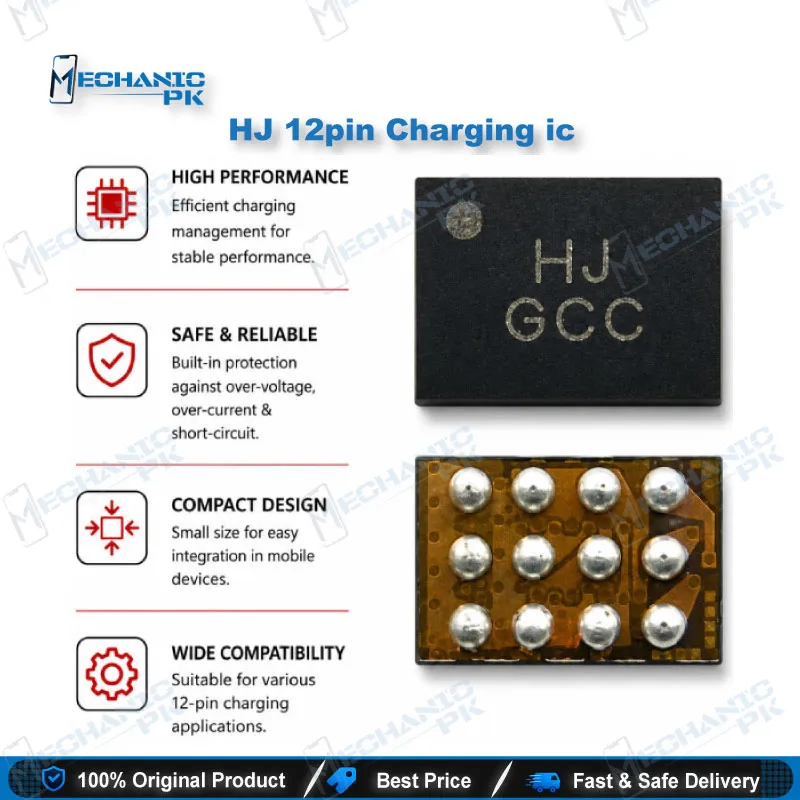
The HJ 12pin Charging ic gives technicians a direct replacement for the HJ-marked 12-pin charging chip found on Android smartphone motherboards. When a phone shows a charging issue that traces back to the USB charging stage, swapping this IC restores the path between the charging port and the battery circuit without replacing the whole board. Its compact 12-pin surface-mount package suits standard hot air rework under a microscope. Match the HJ top marking on your board before ordering, and pair it with a quality hot air station, flux, and a PCB holder for a clean, reliable IC change at your repair bench.
HJ 12pin Charging IC: Precision Replacement for Android Charging Faults
The HJ 12pin Charging ic serves one specific job: restoring a failed USB charging stage on Android smartphone motherboards. If your diagnosis points to a damaged or shorted charging chip carrying the HJ top marking, this HJ 12pin charging IC lets you rebuild the circuit at component level. Mechanicpk supplies it for technicians who work at board level and need a part that matches the original footprint and marking exactly.
Where the HJ 12pin Charging IC Sits in the Charging Circuit
A charging IC sits between the USB connector and the phone’s battery and power management section. It receives incoming voltage from the charger, regulates it, and controls how current reaches the battery. When this chip fails, the rest of the board can stay perfectly healthy while the phone refuses to charge. That makes the charging IC one of the first components a hardware technician inspects once the charging port, cable, and battery check out fine.
Fault Symptoms That Point to the Charging IC
Technicians usually reach for a 12 pin charging IC after ruling out simpler causes. Common signs include a phone that shows no charging response at all, a charging icon that appears while the battery percentage stays flat, very slow charging on a known-good charger, or noticeable heat around the charging section of the board. A phone that goes dead after a faulty charger or a voltage surge often carries damage at this stage too. Liquid damage near the USB area can corrode the IC pins and produce the same symptoms.
Diagnose Before You Replace
Confirm the fault before you lift any component. Measure incoming charger voltage at the IC input with a multimeter, and check the input line for a short to ground. A USB ammeter on the charging cable tells you whether the board draws current at all. If voltage reaches the IC but nothing passes beyond it, or if the input line shows a dead short that clears once you isolate the chip, the charging IC becomes your prime suspect. This step saves you from replacing a good part and missing the real hardware fault.
Replacement Workflow on the Repair Bench
Secure the motherboard in a PCB holder and shield nearby plastic connectors and small components from hot air. Apply good-quality flux around the IC, then heat it evenly with your hot air station until the solder melts, and lift the chip gently with fine tweezers. Clean the pads with solder wick and flux until they sit flat and bright. Align the new HJ 12pin Charging ic with the pin-1 marker on the board, reflow it, and inspect every joint under a microscope for bridges or cold joints before you power the phone. Test charging current again with a USB ammeter to confirm the repair.
Matching the HJ Marking and Footprint
Charging ICs across Android brands share similar sizes but different markings, pinouts, and functions. Always read the top marking on the original chip and compare its 12-pin layout before you install a replacement. A matching HJ marking and footprint give you the strongest confirmation that this part fits your board. Treat any compatibility claim based only on phone model with caution, since manufacturers often change components between board revisions of the same phone.
Build Your Charging Repair Kit with Mechanicpk
Component-level charging repair needs the right supporting tools. Mechanicpk stocks Hot Air Stations and Soldering Stations for controlled rework, Microscopes for pin-level inspection, PCB Holders for stable board mounting, and Multimeters for voltage and short tracing. Technicians who also handle BGA chips can step up to Reballing Kits, while shops that combine hardware and software repair can explore our ISP Pinout Tools, eMMC Programmers, UFS Adapters, and Test Boxes. Keeping a few HJ 12pin charging ICs in stock helps your shop close recurring charging jobs the same day instead of waiting on parts.
| Weight | 0.1 kg |
|---|
Key Features
- 12-pin surface-mount package that matches the HJ charging IC footprint
- HJ top marking allows direct identification against the original chip on the board
- Restores the USB charging stage without replacing the full motherboard
- Suits standard hot air rework with flux and fine tweezers
- Compact size fits micro-soldering work under a stereo microscope
- Targets common charging faults including no charge, slow charge, and input line shorts
- Practical stock part for shops handling frequent Android charging repairs
- Works within a standard bench setup of hot air station, PCB holder, and multimeter
Specifications
| Model | HJ (top marking) |
|---|---|
| Category | Mobile Phone Charging IC |
| Compatibility | Android smartphone motherboards that use the HJ-marked 12-pin charging IC |
| Technology | USB charging IC, 12-pin surface-mount package |
Common Repair Uses
- Phone not charging with a known-good port, cable, and battery
- Charging icon shows but battery percentage does not increase
- Very slow charging on a known-good charger
- Short to ground on the charging input line
- Heating around the charging section of the motherboard
- Dead phone after a faulty charger or voltage surge
- Corrosion damage near the USB charging area after liquid exposure
- Replacing a charging IC damaged during charging port or board rework
Compatible Devices
- Verified at marking and footprint level, not phone-model level
- Android smartphone motherboards fitted with an HJ-marked 12-pin charging IC
- Boards where the original charging chip shows the HJ top marking and a matching 12-pin footprint
- Android repair jobs where the board schematic or boardview identifies the charging IC as HJ
- Replacement of an HJ charging IC removed from a donor board of the same board revision
FAQ
What is the product name?
What is the brand of this product?
What is the model of this product?
What is this product used for?
Which devices are compatible with this product?
Who should use this product?
How do I confirm the charging IC is faulty before replacing it?
Can I replace the HJ 12pin charging IC with a soldering iron instead of hot air?
Related products