





Mechanic X5 Stainless Steel Phone Opening Tool
₨ 1
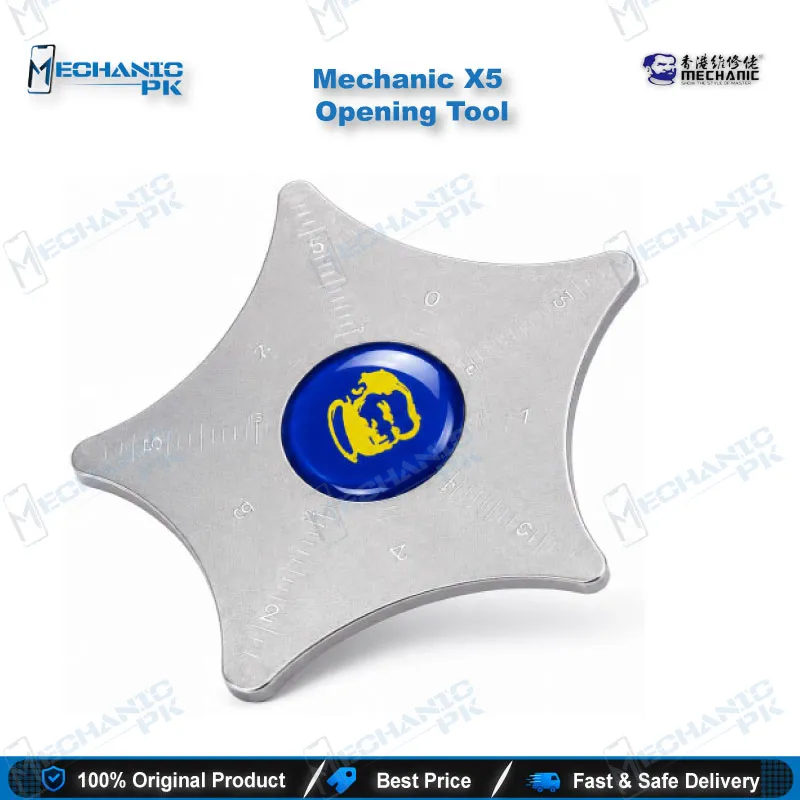
Mechanic X5 Stainless Steel Opening Tool
The Mechanic X5 is a stainless steel opening tool for separating phone and tablet cases during disassembly. Its thin, flexible blade lets you work into the seam around the frame and lift a case without forcing it. Use it at your repair bench when you need to open a device for screen replacement, battery access, or board inspection. Each pack contains one piece, and it is not shaped for a single device model.
Out of stock
Mechanic X5 Opening Tool for Phone and Tablet Disassembly
The Mechanic X5 opening tool gives you a stainless steel blade for the first stage of nearly every phone and tablet repair: separating the case without damaging what sits underneath. Opening is where many repairs go wrong. A blade that is too thick forces the seam, and a blade that flexes too little can bend a frame or crack a glass edge. This tool is built for technicians who want controlled entry into a sealed device. It belongs in the opening stage of your workflow, before any board-level work, and it suits repair shops, service centers, and training benches that handle a wide range of models.
Stainless Steel Construction
The blade is made from stainless steel. The retailer describes the material as corrosion resistant and durable, which matters on a busy bench where tools get exposed to moisture, adhesive residue, and cleaning solvents. Steel also holds its edge and shape better than softer plastic pry tools under repeated use. Keep the blade clean after each device so residue does not build up along the working edge and reduce grip on the seam.
Opening Workflow on the Bench
Start by inspecting the device for screws, sealed corners, and any signs that the case has already been opened. Warm the adhesive if your bench setup allows it, then insert the tip at a corner and move slowly along the seam. Keep the blade at a low angle to the frame so it separates the adhesive rather than bending the metal or glass. Once the seam releases, slide the blade further along the edge in short passes, which reduces the force needed on any single point. Avoid levering against the display, because glass edges chip easily under sustained pressure.
Avoiding Frame and Glass Damage
Most damage during opening happens when a technician applies force in one spot for too long. Work in small sections and check the gap after each pass. If you feel resistance, stop and look for a hidden clip or screw instead of pushing harder. Keep the blade away from flex cables and connectors inside the device, since a slip can tear a ribbon or lift a component. Thin, flexible blades give you more feedback than thick pry bars, which helps you sense when the seam is ready to release and when it is not.
Pairing with Related Repair Tools
The Mechanic X5 fits the opening stage, so it works best alongside tools for the next steps. Use a plastic spudger to disconnect battery and display connectors once the case is open. A heat source or adhesive remover helps when the case glue is stubborn, and a precision screwdriver set handles the internal fasteners you find after separation. For repair shops that handle many device models, a second opening tool with a different blade width gives you options for tight seams. Browse the Opening Tools category on Mechanicpk for the full range.
| Weight | 0.3 kg |
|---|
Key Features
- Stainless steel blade construction
- Thin, flexible blade described by the retailer
- Single-piece pack for focused bench use
- Designed for opening phone and tablet cases
Specifications
| Brand | Mechanic |
|---|---|
| Model | X5 |
| Category | Opening Tool |
| Material | Stainless Steel |
| Compatibility | Universal, not device-specific |
| Pack Contents | 1 piece |
Common Repair Uses
- Uses: Verified scope is opening phone and tablet cases for internal access.
- Separating the back cover or frame before battery replacement
- Opening the case for screen replacement and perimeter adhesive release
- Gaining access to the board for inspection before IC or connector work
- Lifting adhesive seams on devices that need reassembly
Compatible Devices
- Universal, phone and tablet cases, not device-specific
- Smartphone back covers and frames during case separation
- Tablet cases with adhesive perimeter seams
- Universal use across phone brands, since no device list is verified
- Repair benches handling multiple device models
FAQ
What is the product name?
What is the brand of this product?
What is the model of this product?
What is this product used for?
Which devices are compatible with this product?
Who should use this product?
What material is the Mechanic X5 made from?
How do I open a phone case with the Mechanic X5 without damaging the frame?
Related products