

















Qianli Bumblebee Stencil (QS69) MTK MT Series 2
₨ 1
Qianli QS69 MTK Reballing Stencil
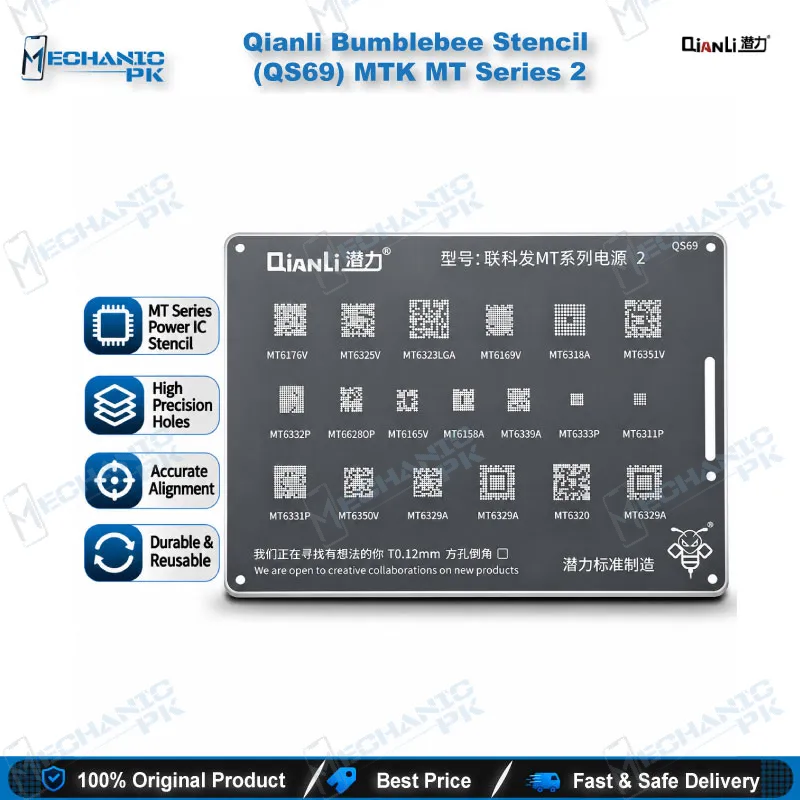
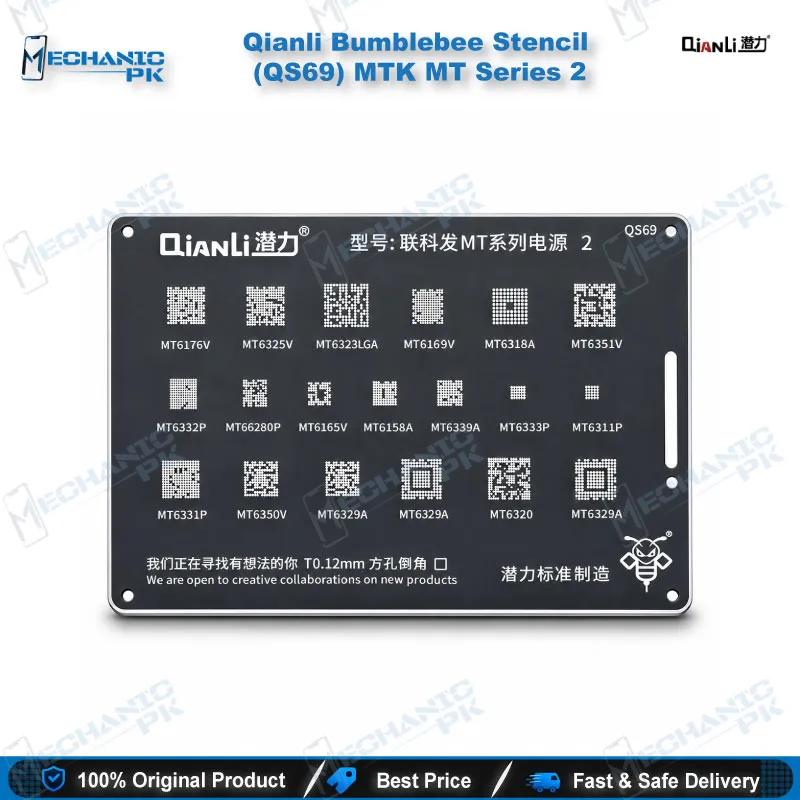
Qianli Bumblebee Stencil (QS69) MTK MT Series 2 is a BGA reballing template for MediaTek boards, built with square holes and rounded angles for clean, even solder ball deposits. Qianli designs the Bumblebee range to stay sturdy and precise through repeated use, so you reball chips on dead phone and hardware fault jobs without improvising. Pair it with your hot air station, PCB holder and microscope for a controlled rework step. Mechanicpk supplies the Qianli Bumblebee Stencil QS69 to Pakistani repair shops and technicians who want a dependable MTK reballing stencil.
Out of stock
Qianli Bumblebee Stencil QS69 for MTK MT Series 2 Reballing
The Qianli Bumblebee Stencil QS69 gives your bench a dedicated BGA reballing template for MediaTek boards in the MT Series 2 group. You pick it when a dead phone, a hardware fault or a failed IC change leaves you with a lifted or replaced chip that needs fresh solder balls. Qianli designs the Bumblebee range around square holes with rounded angles, and QS69 follows that layout. Mechanicpk stocks it for Pakistani repair shops that run MTK work every day and want a clean, repeatable reballing step instead of improvising with loose solder balls.
Where QS69 Sits in the Bumblebee Range
Qianli splits its MediaTek stencils into separate lines. The MTK CPU1 to CPU4 stencils (QS15, QS16, QS18 and others) cover processor packages, while the MT Series stencils form their own group, with QS70 labelled MT Series 1 and QS69 labelled MT Series 2. That naming matters when you build a stencil library. You keep QS69 next to its Series 1 sibling and your CPU-series templates, and you reach for the right one by the marking on the chip in front of you.
The supplier listings for QS69 do not publish a chip-by-chip chart, so this page does not list one either. Before you order for a specific board, read the marking on the IC you plan to reball and confirm the match with our team. That check costs you a minute and saves a stencil that fits the wrong footprint.
What the Stencil Design Gives You on the Bench
Square holes with rounded angles define every stencil in the Bumblebee range. The rounded corners help solder paste or balls release cleanly from each aperture, and the square openings keep the deposit consistent across the pad field. Qianli describes the range as sturdy, precise and durable over repeated use, with an improved surface treatment and newer materials that make the stencil easier to handle than older templates.
You work with it the same way you work with any BGA stencil. You clean the pads, align the apertures over the chip, hold the stencil flat, and deposit paste or balls. A stable hold decides the result, so pair the stencil with a magnetic reballing platform or a PCB holder that keeps the chip from shifting. Apply heat with a hot air station at a controlled temperature, and use a soldering station with a fine tip to clean the pads before you start.
Fitting QS69 into Your MTK Repair Workflow
MTK repair rarely starts with the stencil. You usually begin with a symptom such as a dead phone, boot loop issue, hang on logo or charging issue, then isolate the fault with a multimeter and a test box or ISP pinout tool before you commit to board-level rework. When the diagnosis points to a damaged or replaced chip, QS69 enters the process at the reballing stage.
A microscope makes that stage far more reliable. Under magnification you check that every aperture sits over its pad, that no bridge forms between balls, and that the finished array looks even before the chip returns to the board. If you also handle storage faults, the same bench routine carries over to eMMC programmers and UFS adapters work. Shops that want a complete setup can add a reballing kit with paste, flux and tweezers alongside the stencil.
Because QS69 is a single, low-cost template, technicians in Pakistan often keep several MTK stencils on hand and swap between them job by job. That habit keeps rework quick on a busy workshop day and protects you from reusing a stencil that does not match the package.
| Weight | 0.1 kg |
|---|
Key Features
- Qianli Bumblebee range BGA stencil
- Designed for the MTK MT Series 2 group
- Square holes with rounded angles
- Rounded corners support clean solder ball release
- Sturdy build for repeated reballing use
- Precise aperture layout for consistent deposits
- Improved surface treatment and materials in the Bumblebee range
- Pairs with hot air stations, PCB holders and microscopes
Specifications
| Brand | Qianli |
|---|---|
| Model | QS69 |
| Category | BGA Reballing Stencil (Bumblebee Series) |
| Compatibility | MTK MT Series 2 |
| Technology | Square holes with rounded angles |
Common Repair Uses
- BGA reballing of MTK-series chips after removal
- Reballing after an IC change on a dead phone
- Fresh solder ball deposit on lifted or reworked chips
- Board-level rework for hardware fault jobs on MTK devices
- Building a complete MTK stencil library alongside QS70 and the MTK CPU stencils
- Workshop and training practice on BGA reballing technique
Compatible Devices
- MediaTek (MTK) based boards matching the MT Series 2 stencil group. Supplier listings publish no device-level or chip-level chart, so only this verified scope appears.
- MediaTek (MTK) chipset family boards
- Chips that match the Qianli MT Series 2 pattern (confirm by chip marking before ordering)
- Android phones and tablets built on MTK platforms
FAQ
What is the product name?
What is the brand of this product?
What is the model of this product?
What is this product used for?
Which devices are compatible with this product?
Who should use this product?
Does the QS69 stencil list the exact chips it supports?
What is the difference between QS69 and QS70?
Related products