
















Qianli Bumblebee Stencil (QS10) Qualcomm CPU4 Reballing
₨ 600
Qianli QS10 Reballing Stencil for Qualcomm CPU4
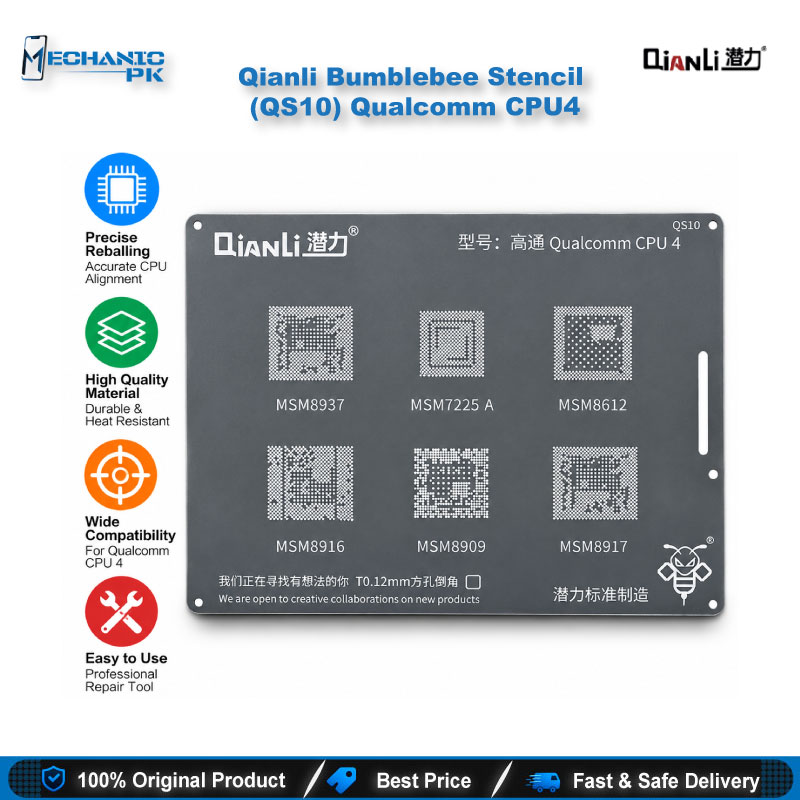
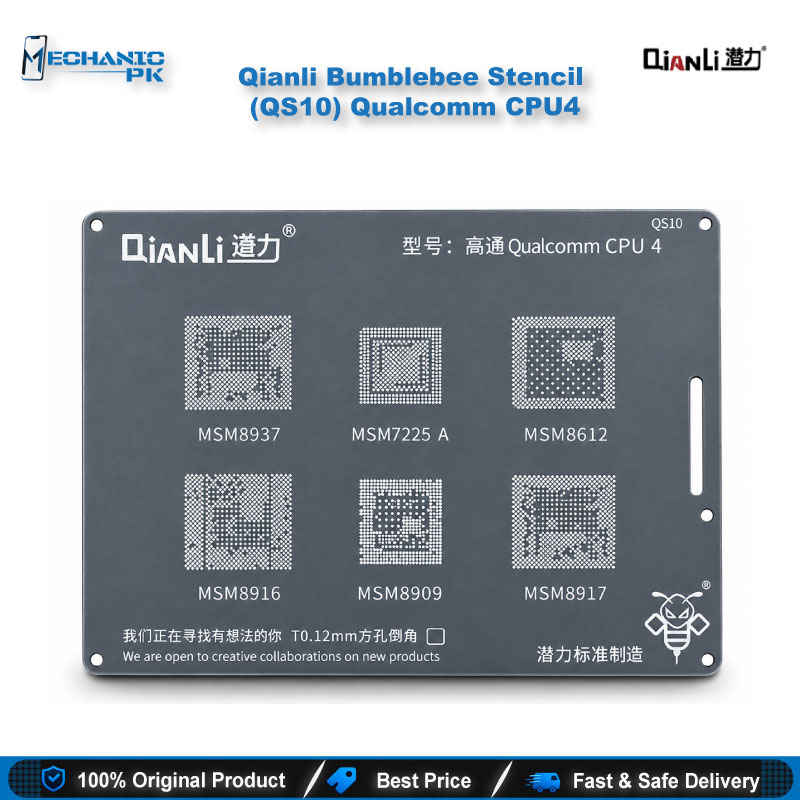
The Qianli Bumblebee Stencil (QS10) Qualcomm CPU4 gives technicians a dedicated BGA reballing plate for Qualcomm processors coded MSM8937, 7225A, 8612, 8916, 8909 and 8917. Qianli’s Bumblebee series uses square holes with rounded corners, a pattern built for precise ball placement during CPU rework. Use this Qianli QS10 reballing stencil after you lift the chip, clean the pads and prepare the board for fresh balls. Mechanicpk supplies it to repair shops, service centers and independent technicians in Pakistan who work on Qualcomm-based Android boards and want a clear, verified chip list before they buy.
In stock
Qianli QS10 Reballing Stencil for Qualcomm CPU4 Chips
The Qianli Bumblebee Stencil (QS10) Qualcomm CPU4 is a purpose-cut BGA stencil for technicians who rework Qualcomm processors on Android mainboards. If you search for a Qianli QS10 reballing stencil, this plate covers the CPU4 group: MSM8937, 7225A, 8612, 8916, 8909 and 8917. One stencil serves all six chip codes, so your bench carries one plate instead of six. Qianli places it in the Bumblebee series, the same range that includes other Qualcomm, MediaTek and Huawei CPU stencils.
Chip Coverage and Stencil Design
Qianli ties the QS10 to six chip codes. Read the marking on the processor you lift and match it against that list before you order, because the stencil fits those codes and nothing outside them. The Bumblebee series uses square holes with rounded corners, a pattern Qianli built for BGA work. Qianli also describes a newer surface treatment and newer materials in this series, aimed at precise ball placement and long service life under daily workshop use. You get a single-purpose plate with one job: pad alignment for the Qualcomm CPU4 group. Because the chip list is fixed, you never guess at compatibility on the bench, and you can stock the plate against the exact processors your shop sees most.
Where the QS10 Fits in Your Reballing Workflow
CPU reballing starts after the chip comes off the board. You lift the processor with a hot air station or preheater, clean the pads with flux and desoldering wick, and then bring in the stencil. Align the openings over the pads or over the chip, fill them with solder paste or place balls, and reflow until the balls form. Check the result under a microscope before you seat the chip back on the board. The QS10 handles the alignment step, which decides whether the finished chip sits flat and every ball lands on its pad. Hold the plate flat while you work, keep it steady with a PCB holder or heat-resistant tape, and let the board settle before you lift the stencil so the balls stay in position.
Technicians reach for this step when a board shows a dead phone symptom, hangs on logo, or loops in boot after a CPU reflow suggests weak or cracked joints. A fresh set of balls gives the processor a clean connection to the PCB, and the stencil keeps that set uniform. Reballing a Qualcomm CPU4 chip with the wrong plate wastes the chip and the pads, so confirm the chip code first and treat the stencil as a precision part, not a consumable. Clean flux and old paste off the openings after every job so residue never blocks the next one, and store the plate flat so it keeps its shape.
Buying Notes for Repair Shops and Service Centers
Shops that rework Qualcomm boards in volume usually buy by chip group, and the QS10 follows that logic. Pair it with a reballing kit, a stable PCB holder and a microscope so the alignment step stays repeatable across jobs. A hot air station and a soldering station cover the lift and clean-up, while a multimeter confirms the board reads correctly before you commit to a chip swap.
After the CPU work, many boards also need software attention. Test boxes and ISP pinout tools help you flash the phone, and eMMC programmers or UFS adapters cover the storage side when the same board needs it. Qianli’s Bumblebee range lists other Qualcomm CPU groups, so a shop that outgrows the CPU4 group can extend coverage with a stencil built for the next chip family. Mechanicpk stocks the QS10 for technicians, repair shops and service centers across Pakistan who want a Qualcomm CPU4 stencil with a clearly defined chip list.
| Weight | 0.1 kg |
|---|
Key Features
- Dedicated stencil for the Qualcomm CPU4 chip group
- Covers MSM8937, 7225A, 8612, 8916, 8909 and 8917 with one plate
- Part of Qianli's Bumblebee BGA stencil series
- Square holes with rounded corners for BGA reballing
- Newer surface treatment and materials for precision and durability
- Fits the alignment step of a standard CPU reballing workflow
- Pairs with hot air stations, reballing kits, PCB holders and microscopes
- Clear chip list that removes compatibility guesswork
Specifications
| Brand Entity | Qianli |
|---|---|
| Product Entity | Qianli Bumblebee Stencil (QS10) Qualcomm CPU4 |
| Technology Entity | BGA reballing stencil, square-hole rounded-corner pattern |
| Compatible Device Entities | Qualcomm MSM8937, 7225A, 8612, 8916, 8909, 8917 |
| Repair Process Entity | CPU reballing, BGA rework, PCB repair |
| Industry Entity | Mobile phone repair, GSM repair |
Common Repair Uses
- Reballing a Qualcomm CPU after removal from the PCB
- Replacing worn or cracked balls under a processor
- Preparing a CPU for reinstallation after a hot air lift
- Reworking a dead phone with suspected weak CPU solder joints
- Reworking a boot loop or hang on logo fault tied to CPU joints
- Reballing a donor chip before a CPU swap
- Aligning fresh balls on pads after flux and wick cleanup
- Repeat CPU reballing jobs in a service center workflow
Compatible Devices
- Verified chip-level scope only (Qualcomm CPU4 group); Qianli does not publish a device-by-device list
- Qualcomm CPU4 chip group
- MSM8937
- 7225A
- 8612
- 8916
- 8909
- 8917
- Android boards built on the chip codes above (chipset-based, not device-specific)
FAQ
What is the product name?
What is the brand of this product?
What is the model of this product?
What is this product used for?
Which devices are compatible with this product?
Who should use this product?
Which Qualcomm chip codes does the Qianli QS10 stencil support?
Can I use the QS10 for other Qualcomm CPU groups like CPU 1, CPU 2 or CPU 4?
Related products