Relife TK5 8-in-1 Multifunctional Blade Set
₨ 1,400
Precision Blade Set for Board-Level Rework
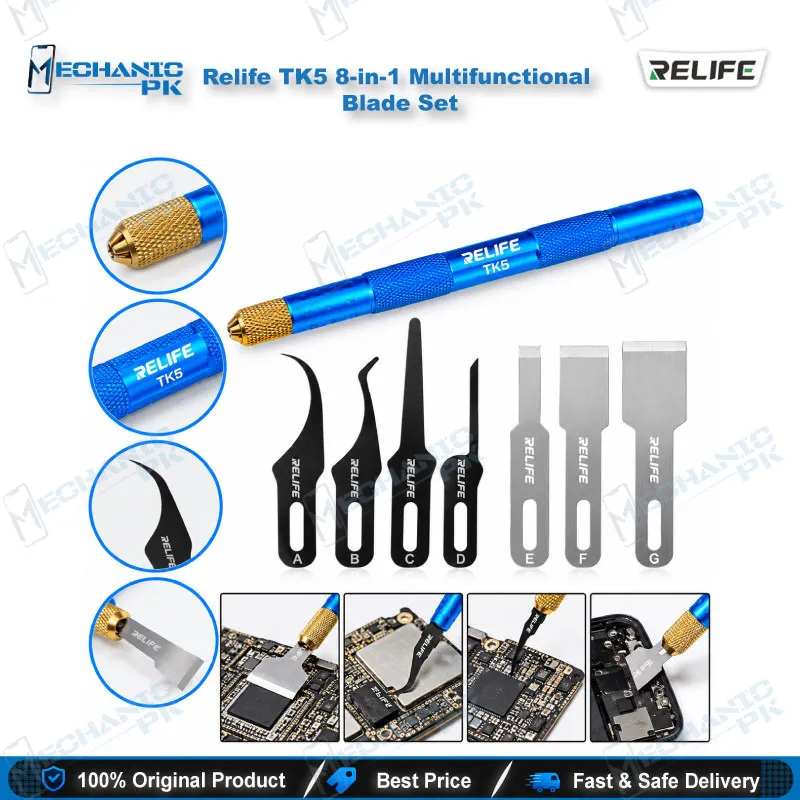
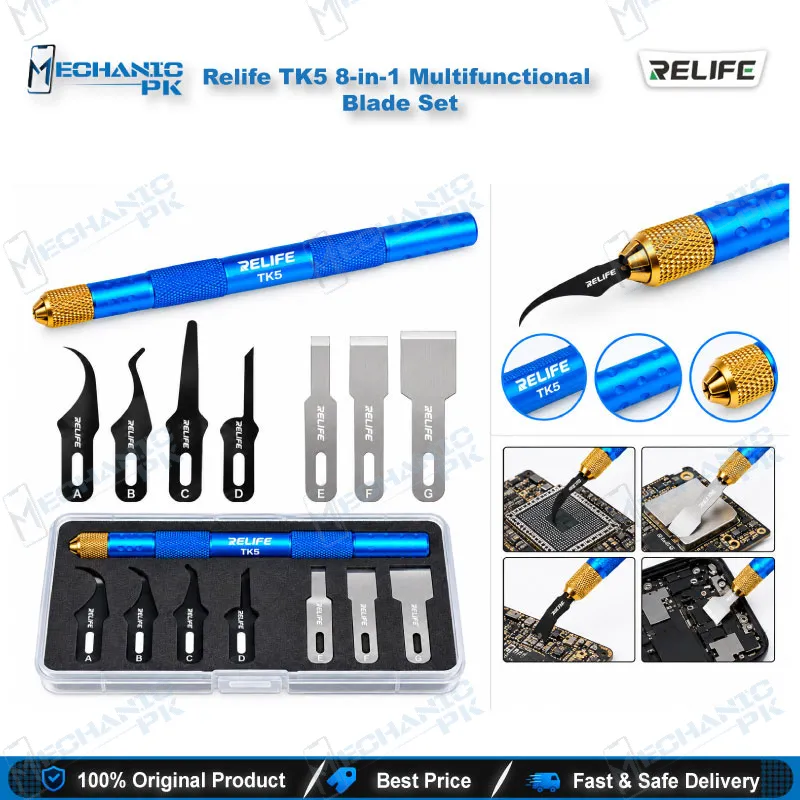
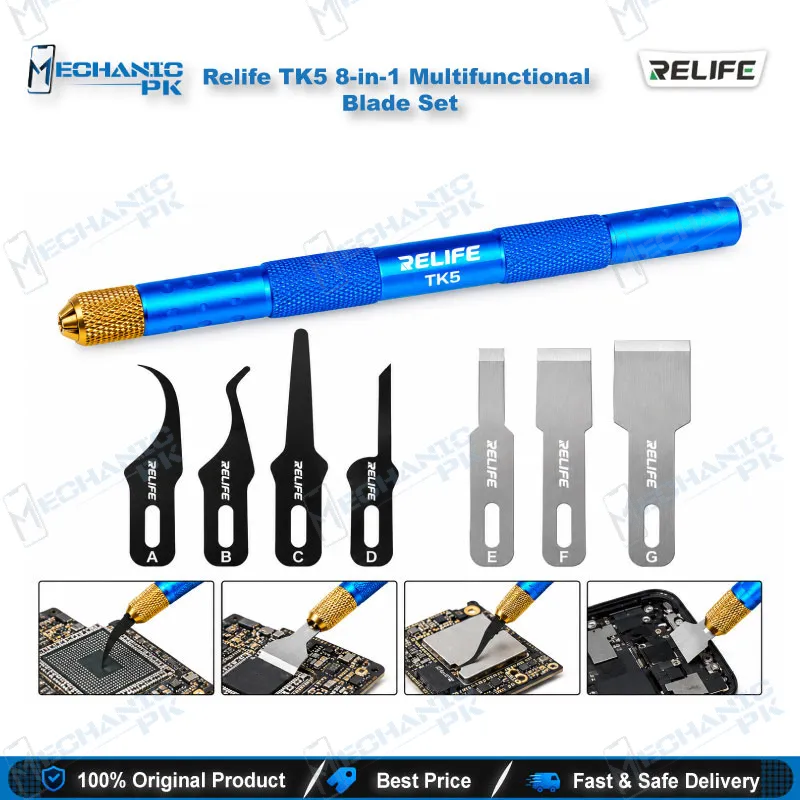
The Relife TK5 8-in-1 Multifunctional Blade Set gives board-level technicians seven interchangeable alloy blades and one non-slip handle in a single kit. Hook, flat, angled and ultra-thin profiles cover black glue cleaning, IC edge adhesive removal, CPU prying and layer separation on smartphone, tablet, MacBook and console boards. Laser-cut, polished edges hold their shape under pressure, so you work close to SMD components without damaging traces. Add the Relife TK5 blade set to a bench that already runs hot air stations, microscopes and PCB holders, and your IC and CPU rework setup from Mechanicpk Pakistan gets a dedicated glue and layer tool.
In stock
Relife TK5 Blade Set for IC, CPU and Black Glue Cleaning
The Relife TK5 8-in-1 Multifunctional Blade Set targets the stage of board repair where most technicians lose time: clearing hardened glue around ICs and CPUs before any rework starts. The Relife TK5 blade set packs seven interchangeable blades and one ergonomic, non-slip handle, which gives you hook, flat, angled and ultra-thin geometries without carrying separate knives. Relife builds the TK5 as an 8-in-1 set for high-density micro-electronics, and the blade shapes match that job: narrow enough to work between SMD components and IC chips, stiff enough to pry packages and board layers. Pakistani repair shops that handle dead phone and hardware fault jobs every day need this kind of dedicated glue and layer tool, because a general-purpose cutter damages boards that a purpose-shaped blade saves.
Blade Geometry and Material
Relife cuts each blade from a high-toughness, deformation-resistant alloy and describes the steel as alloy steel chosen for flexibility and durability. Laser cutting forms the profile, and polishing finishes the surface to improve toughness and rebound. That matters at the microscope: a blade that bends and stays bent forces you to stop mid-job, while a blade that springs back lets you hold one angle along an entire IC edge. The four geometries let you match the blade to the gap instead of forcing one knife into every job. The set includes an edge adhesive knife for IC edge glue, prying blades for ICs and CPUs, a special-shaped blade for cutting glue, and tools for hard disk components and black adhesive removal.
Where the TK5 Fits in Your Repair Workflow
Glue removal sits between diagnosis and rework. Once your multimeter, microscope or test box points to a suspect IC, you need clean access to the package edge before you apply heat. The TK5 handles that step. You clear black glue, work the edge adhesive free around the IC, and pry the part once your hot air station or soldering station has done its job. Technicians who do IC change karna on CPU and NAND packages use the same blades afterward to clean residue before the reballing kit and stencil come out. A PCB holder keeps the board still while you work, and that stability lets the thin blades do precise work without slipping onto neighbouring components.
Layered Boards, Face Recognition Modules and Hard Disk ICs
The listed applications go beyond plain glue cleaning. The set removes upper motherboard layers on stacked boards, supports face recognition module repair, pries hard disk ICs, and strips CPU adhesive. The target devices cover smartphones, tablets, MacBooks and game consoles, and the set carries a universal listing, so you can use it across brands and board types instead of buying model-specific tools. Slide the blade under the edge and let the geometry do the work; forcing a blade through cured epoxy shortens its life and risks the traces beneath it. Start with the ultra-thin blade when the gap is tight, step up to a flat or angled blade once you open a lead, and keep the hook blade for pulling residue out of corners. Work under magnification, take short passes, and clean the blade between passes so hardened glue does not build up on the edge and drag across the board.
Why Technicians Choose This Kit
For a buyer who already knows the trade, the case is simple. You get seven blade shapes and a handle in one set, a spec sheet that names the actual jobs each blade handles, and a tool that sits at the entry point of the board-level upgrade path. Technicians who start with the TK5 usually move on to hot air stations, soldering stations, ISP pinout tools and eMMC or UFS programmers as their work shifts from glue and prying to full chip-level repair. Mechanicpk stocks the TK5 alongside those categories, so you build the bench in one order.
| Weight | 0.15 kg |
|---|
Key Features
- 7 interchangeable blades plus 1 handle (8-in-1 set)
- Hook, flat, angled and ultra-thin blade geometries
- High-toughness, deformation-resistant alloy steel blades
- Laser-cut profiles with polished finish for better rebound
- Edge adhesive knife for IC edge glue
- Prying blades for ICs and CPUs
- Special-shaped blade for cutting glue
- Ergonomic non-slip handle
Specifications
| Brand Entity | Relife |
|---|---|
| Product Entity | Relife TK5 8-in-1 Multifunctional Blade Set |
| Technology Entity | Laser-cut alloy steel blades |
| Compatible Device Entities | Smartphones, tablets, MacBooks, game consoles |
| Repair Process Entity | IC and CPU glue removal, black glue cleaning, IC prying |
| Industry Entity | Mobile repair, PCB repair, board-level rework |
Common Repair Uses
- Glue and layer work before and after IC and CPU rework
- Black glue (epoxy) cleaning
- Residue removal around ICs
- IC edge adhesive removal
- Prying ICs and CPUs
- CPU adhesive removal
- Hard disk IC prying
- Upper motherboard layer removal
- Face recognition module repair
Compatible Devices
- Universal, not device-specific; suited to smartphone, tablet, MacBook and console boards
- Smartphone motherboards
- Tablet motherboards
- MacBook logic boards
- Game console boards
- Boards with black glue around ICs
- CPU packages with edge adhesive
- Hard disk (NAND) ICs
- Face recognition modules
FAQ
What is the product name?
What is the brand of this product?
What is the model of this product?
What is this product used for?
Which devices are compatible with this product?
Who should use this product?
How many blades come with the Relife TK5 set and what shapes do they have?
Can the Relife TK5 clean black glue around a CPU or IC before IC change karna?
Related products